How to Remove AI Watermark (2026 Guide): Safe, Fast & Legal Methods for Images and Videos

Introduction
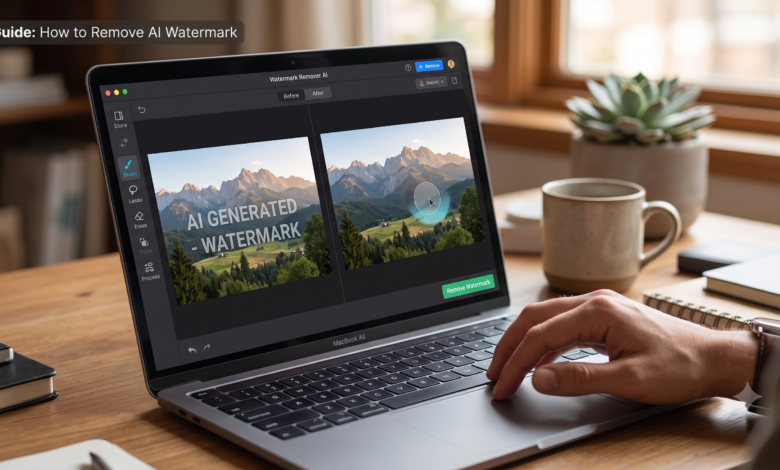
AI-powered image and video generators have become part of everyday creative work. Many free versions of these tools add a watermark to exported content. If you’re wondering how to remove AI watermark, the answer depends on how the watermark was added and whether you have permission to remove it.
In many cases, the easiest and most appropriate solution is to upgrade to a paid plan or use the platform’s official export option. If the watermark appears on content you own, there are also legitimate editing techniques that can help improve the appearance of the image or video while respecting the platform’s terms of service.
This guide explains how AI watermarks work, when they can be removed, and the safest methods for handling watermarked AI-generated content in 2026.
What Is an AI Watermark?
An AI watermark is a visible or invisible identifier added to AI-generated content. Some platforms place a logo or text on exported images and videos, while others embed hidden metadata to identify AI-generated files.
Common reasons for AI watermarks include:
- Brand recognition
- Copyright protection
- Free-plan limitations
- Authenticity verification
- Responsible AI disclosure
Understanding the type of watermark you’re dealing with is the first step before deciding what to do.
Why Do AI Tools Add Watermarks?
Most AI companies use watermarks for several practical reasons.
They encourage users to upgrade to premium subscriptions, protect intellectual property, reduce misuse of AI-generated media, and help viewers identify synthetic content.
Some platforms also include invisible watermarks that are designed to remain even after basic editing.
Is It Legal to Remove an AI Watermark?
Legality depends on the source of the content and the platform’s terms.
Generally:
- Removing a watermark from content you created and are authorized to edit may be acceptable if the platform allows it.
- Removing another creator’s watermark without permission may violate copyright laws or platform rules.
- Commercial use should always comply with licensing agreements.
Always review the license and terms before modifying exported AI content.
How to Remove AI Watermark the Right Way
1. Export Without a Watermark
Many AI tools allow watermark-free downloads after purchasing a premium subscription.
This is the simplest solution because it preserves quality and complies with licensing requirements.
2. Recreate the Image
If you still have the original prompt, regenerate the image using a platform that allows watermark-free exports.
This often produces cleaner results than editing a watermarked image.
3. Crop the Watermarked Area
If the watermark is positioned near the edge, cropping may remove it without significantly affecting the composition.
This method works best when the watermark occupies only a small portion of the image.
4. Use Standard Photo Editing
For images you own and are authorized to modify, common editing techniques such as careful retouching, cloning, or content-aware repair can reduce distractions while maintaining image quality.
Avoid over-editing, as it may introduce visible artifacts.
5. Rebuild the Design
For graphics containing text, logos, or simple layouts, rebuilding the design from the original assets often produces a cleaner and more professional result than attempting to erase a watermark.
Removing AI Watermarks from Videos
Video watermarks are generally more difficult to address because they appear across multiple frames.
If you own the source material, options include:
- Exporting a licensed version without a watermark.
- Re-editing the project from the original files.
- Cropping the frame if the watermark is near the edge.
- Recreating the sequence using the original assets.
These methods help preserve video quality while respecting licensing terms.
Common Mistakes to Avoid
Many people make mistakes that reduce quality or create legal issues.
Avoid:
- Downloading unknown “watermark remover” software.
- Removing another person’s branding without permission.
- Using copyrighted content commercially.
- Over-editing images until they appear unnatural.
- Ignoring the platform’s licensing terms.
Tips for Better AI Content
Instead of focusing on watermark removal, consider improving your workflow.
Best practices include:
- Save original prompts.
- Keep editable project files.
- Export in high resolution.
- Use licensed AI platforms for commercial work.
- Maintain organized backups.
These habits save time and help avoid unnecessary editing later.
Frequently Asked Questions
Can I remove an AI watermark from my own content?
If the platform allows it or provides a watermark-free export through your license, yes. Otherwise, follow the platform’s terms and use authorized editing methods.
Will removing a watermark reduce quality?
It can. Cropping or extensive editing may change composition or introduce visual artifacts, which is why obtaining a clean export is usually preferable.
Why do free AI generators add watermarks?
They often use watermarks to distinguish free-plan exports, promote their service, and encourage upgrades to paid plans.
Are invisible AI watermarks removable?
Invisible watermarks and metadata may persist after basic editing. Their behavior depends on how they were embedded and the specific technology used.
Final Thoughts
Knowing how to remove AI watermark starts with understanding why the watermark exists. The most reliable approach is to obtain a licensed, watermark-free export from the platform whenever possible. When editing content you own, use careful, legitimate techniques that preserve quality and comply with licensing terms.
Following these practices helps you create professional-looking images and videos while respecting creators’ rights and platform policies.